Document Extraction & Recognition

Turn Any Document Into Structured Data

Custom Document AI that extracts structured fields from images, PDFs, and OCR with high accuracy.

DER — Live Extraction Demo

Input Document

Sample Aadhaar Card
name
dob
gender
uid

Extracted Fields

name 0.939

"Karan XXX Reddy"

dob 0.955

"05/XX/1998"

gender 0.913

"MALE"

uid 0.966

"XXX XXXX XXXX 7890"

What It Does

Documents in. JSON out.

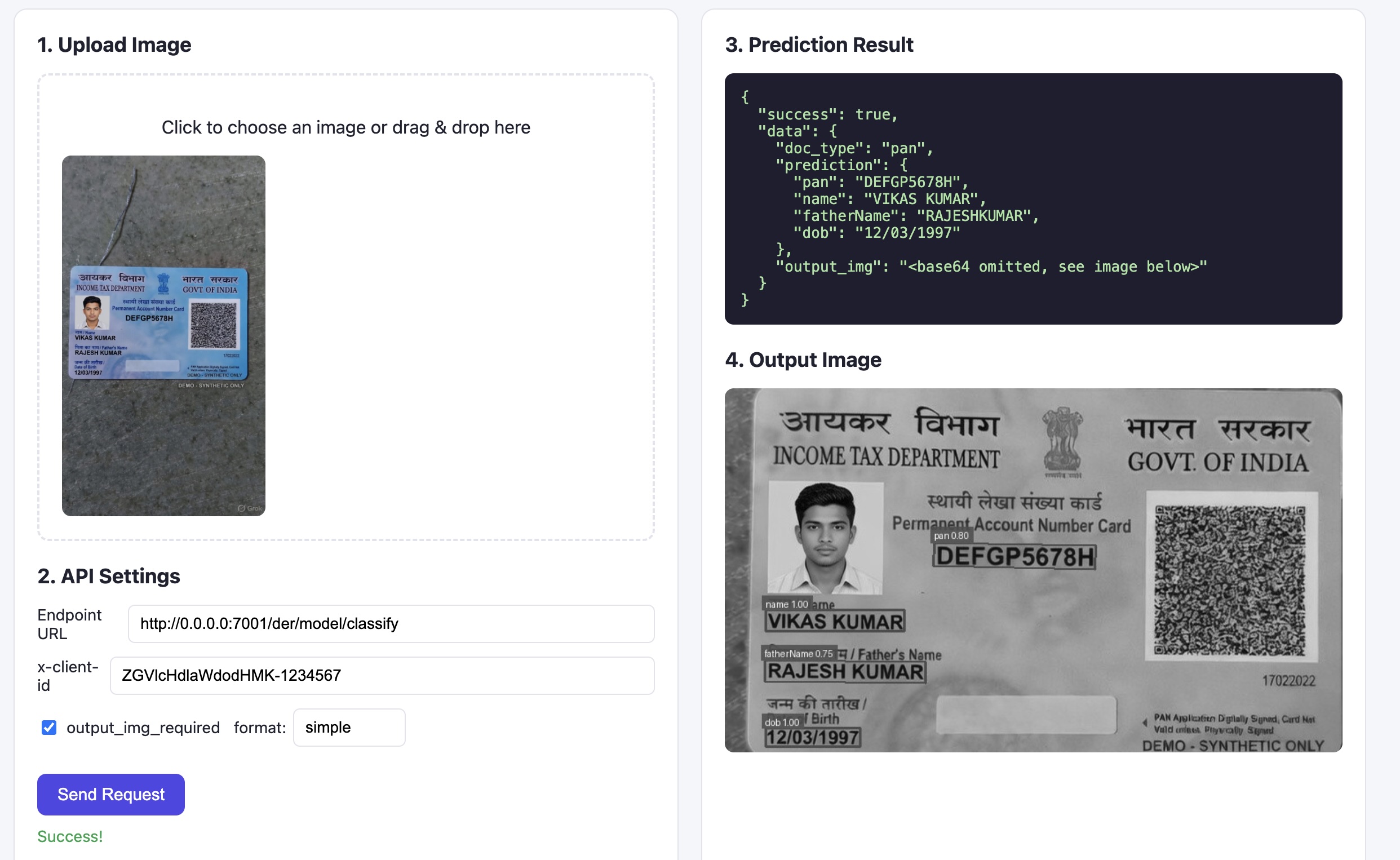
Deepweights DER is a Document AI platform that converts unstructured documents — scans, photos, PDFs — into clean structured JSON your applications can use directly.

  • Custom-trained per document type — not a generic model
  • Returns boxes with label, text, score, and bounding coordinates — or flat key-value with
  • Handles noisy real-world documents — not just clean lab scans
response.json
// Response (default — layout output)
{
  "width": 1280, "height": 816,
  "boxes": [
    { "label": "name",   "text": "Karan XXX Reddy",     "score": 0.939, "box": [[426,230],[704,230],[704,265],[426,265]] },
    { "label": "dob",    "text": "05/XX/1998",           "score": 0.955, "box": [[422,273],[828,273],[828,306],[422,306]] },
    { "label": "gender", "text": "MALE",               "score": 0.913, "box": [[421,319],[590,319],[590,359],[421,359]] },
    { "label": "uid",    "text": "XXX XXXX XXXX 7890", "score": 0.966, "box": [[372,647],[960,647],[960,690],[372,690]] }
  ]
}

// Add ?format=simple for clean key-value output
{ "name": "Karan XXX Reddy", "dob": "05/XX/1998", "gender": "MALE", "uid": "XXX XXXX XXXX 7890" }
Features

Built for production accuracy

Everything you need to extract structured data from documents at scale.

Custom-trained models

Each document type gets its own model trained on your samples — no generic one-size-fits-all approach.

Any OCR, any source

Works with Google Vision, Azure AI Vision, or custom OCR — any engine that outputs BoundingPoly coordinates.

Regex validation & formatting

Optional post-extraction rules to validate and reformat dates, IDs, phone numbers, and more.

Layout-aware extraction

Uses spatial position alongside text. Bounding boxes tell the model where a field appears — not just what it says.

High accuracy on noisy docs

Handles skewed scans, low-res photos, mixed-script text, and stamps — real-world conditions, not lab images.

Simple REST API

One endpoint, JSON in, JSON out. Two modes: direct image upload or pass your OCR output. No SDK required.

How It Works

Three steps to production

From document samples to live API in days.

1

Share sample documents

Send us a set of sample documents — no annotation needed. We handle all labelling and annotation ourselves.

2

We train and deploy

We train a custom model for your document type and deploy it on our infrastructure — fully managed, no setup on your end.

3

Call API, get structured output

Send your OCR output or raw image. Get structured fields back — with layout coordinates and confidence scores — in milliseconds.

API Reference

Two ways to call the API

Bring your own OCR output, or upload an image and let us handle OCR via Google Cloud Vision or our internal model. Same structured response either way.

// POST /der/model/predict/{model_id} — Send OCR output (rec + det), model ID in path

POST /der/model/predict/{model_id}
Content-Type: application/json

{
  "rules": {},
  "rec": [
    "Karan XXX Reddy",
    "जन्म तिथि/DOB: 05/XX/1998",
    "पुरुष/ MALE",
    "XXX XXXX XXXX 7890"
    ...  // full OCR text array
  ],
  "det": [
    [[426,230],[704,230],[704,265],[426,265]],
    [[422,273],[828,273],[828,306],[422,306]],
    ...  // bounding boxes for each word
  ],
  "width": 1280,
  "height": 816
}

─────────────────────────────────────────
// Response (default — layout output)
{
  "width": 1280, "height": 816,
  "boxes": [
    { "label": "name", "text": "Karan XXX Reddy", "score": 0.939, "box": [[426,230],...] },
    { "label": "dob",  "text": "05/XX/1998",      "score": 0.955, "box": [[422,273],...] },
    { "label": "uid",  "text": "XXX XXXX XXXX 7890", "score": 0.966, "box": [[372,647],...] }
  ]
}

// Add ?format=simple for clean key-value output
{ "name": "Karan XXX Reddy", "dob": "05/XX/1998", "gender": "MALE", "uid": "XXX XXXX XXXX 7890" }
?format=simple

Append ?format=simple to either endpoint to receive a flat key-value object instead of the full layout response. Ideal for downstream application logic.

Output

Two output formats

Simple key-value fields, or full layout data with positions and scores.

// GET ?format=simple — flat key-value response

{
  "name":   "Karan XXX Reddy",
  "dob":    "05/XX/1998",
  "gender": "MALE",
  "uid":    "XXX XXXX XXXX 7890"
}

// Default — layout output with bounding boxes, labels, and scores

{
  "width": 1280, "height": 816,
  "boxes": [
    {
      "label":    "name",
      "text":     "Karan XXX Reddy",
      "fmt_text": null,
      "score":    0.9385673851198314,
      "box":      [[426,230],[704,230],[704,265],[426,265]]
    },
    {
      "label":    "dob",
      "text":     "जन्म तिथि/DOB: 05/XX/1998",
      "fmt_text": null,
      "score":    0.9548244589662007,
      "box":      [[422,273],[828,273],[828,306],[422,306]]
    },
    {
      "label":    "uid",
      "text":     "XXX XXXX XXXX 7890",
      "fmt_text": null,
      "score":    0.9663165262058003,
      "box":      [[372,647],[960,647],[960,690],[372,690]]
    }
  ]
}
Privacy-first Document AI

Zero Data Retention

Your documents never leave without a trace — because they never stay.

No input storage

Documents and images are never written to disk or persisted anywhere in our infrastructure.

No output storage

Extracted fields are returned to you and never cached or stored server-side.

No request/response logging

API payloads are never logged. What goes in stays completely private.

Only request count tracked

Billing uses only an anonymized request counter — nothing else is tracked.

OCR Flexibility

Bring Your Own OCR

No OCR lock-in — use any engine that outputs BoundingPoly (polygon coordinates per word). We use spatial layout for extraction, so polygon accuracy matters.

Google Vision OCR

Best for high-volume cloud pipelines.

Custom OCR

Any engine that outputs BoundingPoly coordinates.

Advanced Privacy Mode

You can send detection only — bounding boxes without text — when you have sensitive data. The model works from spatial layout alone, so OCR text never leaves your infrastructure.

Use Cases

Built for regulated industries

High-stakes document extraction where accuracy and privacy matter most.

KYC / Identity Verification

Extract name, date of birth, ID numbers, and address from identity documents at scale — Aadhaar, passports, driver's licenses.

National ID cards & Aadhaar
Passports & travel documents
Driver's licenses
Pricing

Pay per request

Pricing scales with document complexity — measured by the character length of the serialized detection array. No monthly minimums.

len(json.dumps(det))
Tier
Per request
Per 1k requests
Up to 300
T1
$0.0002
$0.2000
301 – 600
T2
$0.0005
$0.5000
601 – 900
T3
$0.0008
$0.8000
901 – 1200
T4
$0.0012
$1.2000

Tier is determined by len(json.dumps(det)) — the character length of the JSON-serialized detection array. Price estimates above are based on a 1024 vector dimension model. Only request count is tracked — no data retained.

Image upload endpoint: Extraction pricing follows the same tier structure, but OCR cost is charged separately on top — billed based on the OCR provider used (Google Cloud Vision or internal model).

Start extracting structured data today

Get API access and go from document chaos to structured JSON in days.